> For the complete documentation index, see [llms.txt](https://docs.solscan.io/llms.txt). Markdown versions of documentation pages are available by appending `.md` to page URLs; this page is available as [Markdown](https://docs.solscan.io/browsing-the-site/search-bar.md).
# Search Bar
The Search Bar allows you to search for tokens, programs, and transaction trackings, in a clean and easy-to-follow manner.
Solscan Search
With our updated and optimized interface, users can now perform search functions with ease, simply by typing the name of the NFT or the Program within the search bar.\
\
Within the search results themselves, we have sorted them into different categories that allow for easy tracking and monitoring. This, combined with Account Labeling, becomes a great tool for tracking and alpha searching across the Solana Ecosystem.\
\
Below are the examples of how various search results are displayed.\
\
**Token Search ($DUST)**
$DUST token (from DeGods)
**Program Search (Metaplex)**
Metaplex Program
**NFT Search**
**Solana Domain Name Service Search (Bonfida Integration)**
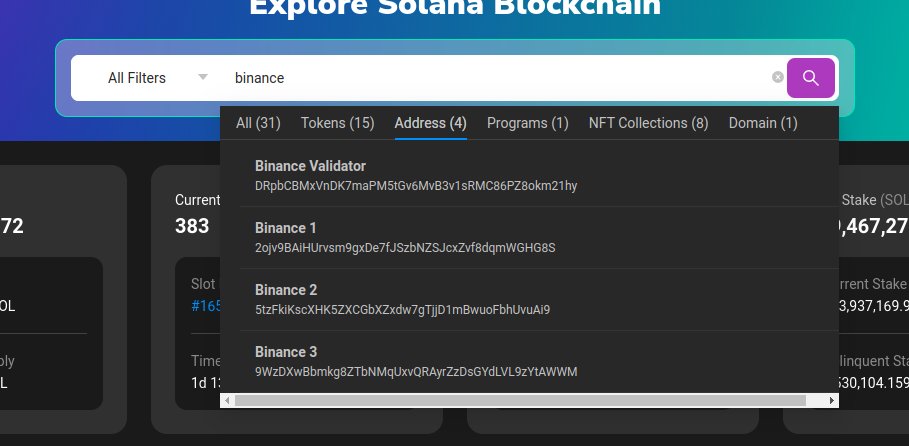
With the newest update, users now can utilize our Search Optimization for ultimate transparency.
Users can now look for labeled addresses on Solscan by typing the name of the project/exchange and voilà, all results will be displayed for preview.
.png?alt=media&token=134686dc-c9ae-4638-89ed-0c3d508f019e)
.png?alt=media&token=d7d683d1-e3e0-406c-b92c-79c0f8c69ca8)
.png?alt=media&token=291e4a1b-e3e2-4883-b85f-512fc4a3d1f5)
.png?alt=media&token=ed3f0311-329c-410d-83b7-8b06515312d6)
.png?alt=media&token=aff2f22d-03a8-4919-acb4-548a91cc435e)